
We're always here to help!
Feel free to reach out to us at any time for help or support or to share a suggestion on how we can improve the learning site! Complete the contact form below and we will get back to you shortly.
Note
You can also contact us using the site's built-in messaging system following the steps below:
-
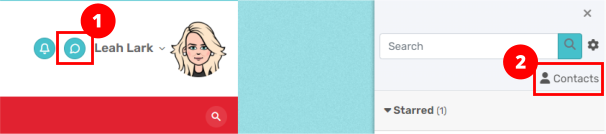
- Click the messaging icon to the left of your username in the top right corner of any screen.
-
- In the Search box, type Admin User and then click Enter.
- Click on the three dots ellipsis to the right of the name in the message panel and choose Add to contacts.
- You can then select the contact and send a message.
Note: If you message someone who is currently logged in, the use will see a pop-up notification and can respond immediately; otherwise, the message is stored unread and the user can reply the next time they log in.